
Machine monitoring
Every machine’s true state, on one screen
ThingConnect connects to each CNC control in its native protocol and shows the whole floor live — running, idle, down, or offline — with the alarm code and its plain-language meaning when something stops.
What you can’t see from the aisle
- A machine that looks busy from the aisle has been idle 40 minutes with the spindle warm.
- The night shift ran at half pace and nobody knew until the morning meeting.
- An alarm flashed on the control, the operator cleared it, and there is no record of what it was.
- Utilization reports depend on whoever remembered to fill the sheet.
How ThingConnect does it
Controller-native connection
No sensors taped to spindles, no current clamps guessing. State comes from the control itself — including why the machine stopped, not just that it stopped.
Alarms, explained
Controller alarm codes are captured live with plain-language descriptions, so a supervisor knows whether it’s a 30-second reset or a service call.
Quiet until it matters
The supervision view keeps normal machines calm and makes the abnormal one impossible to miss — designed for a wall screen, readable across the floor.
Five real screens, one connection
Everything below is a real ThingConnect screen, not a mockup — flip through the ones your team will actually open every shift.
Timeline Wall
Timeline Wall
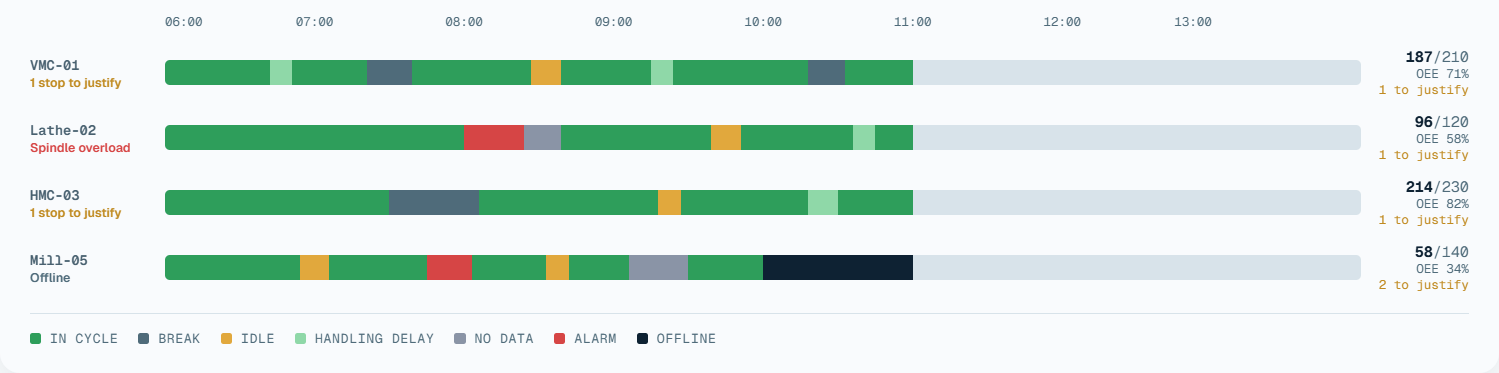
Every machine on the floor, one shift, one screen — colour-coded by state so a supervisor reads the whole plant at a glance, without opening a single machine.
- Reads the controller's own run state, not a sensor guess
- Dense per-machine segments show exactly when and how long each stop ran
- Parts good/total and OEE sit next to every row — no separate report to open
 Tap to zoom
187/210
OEE 71%
1 to justify
96/120
OEE 58%
1 to justify
214/230
OEE 82%
1 to justify
58/140
OEE 34%
2 to justify
Operator Screen
A live screen at the machine, not just the office
Every deployment includes an operator-facing tablet mounted at the machine — the same live shift data as the screens above, read by the person actually running the part.
- Part count against the shift plan, and the machine's exact state — running, idle, or down — at a glance
- An unclassified stop surfaces the moment the machine goes idle; the operator tags a reason in two taps, right at the machine
- The same hour-by-hour rhythm, plus OEE, availability, performance and quality for the shift so far
- A dedicated button logs a rejected part on the spot, with a reason — not a note left for the end of shift
Program History
Every program change, kept — and shown line by line
Every time a program’s G-code changes on the control, ThingConnect captures it and keeps the history — so “who changed the offset and when” has a real answer instead of a guess.
- Every capture kept, not just the current version
- A real line-by-line diff against the capture immediately before it
- Nothing to configure — a change is detected and captured automatically
Program Library
Files
10 lines (10 loc) · 0.14 KB
What’s next
AI is part of where predictive maintenance is headed
AI-assisted pattern recognition over the same live run-state and tool-wear data these screens already collect, to flag a machine trending toward failure before it costs a shift — not after.
See how it works →Questions
Before you book a demo
CNC machines across the major controller brands found on Indian shop floors — machining centers, turning centers, and tapping centers. Tell us what your floor runs and we confirm connectivity machine-by-machine in the site survey.
No hardware on the machine. ThingConnect talks to the controller over your plant network. Older controls without Ethernet are assessed during the site survey.
Machine state updates within seconds. The dashboard is watched on shop-floor TVs and office screens simultaneously.
Yes — dashboards are cloud-hosted, so the plant is visible from the office, home, or a phone. A gateway in your plant buffers data through internet outages, and an on-premise enterprise deployment is available for plants that need everything inside their firewall.
See it on machines like yours
A 30-minute demo, then a pilot on your own floor if it fits.