
Production tracking
Part counts from the controller, not the clipboard
ThingConnect reads production counts and cycle data straight from each machine’s control, so you see actual output against plan, hour by hour, while the shift is still running.
Purpose-built for machines controller-native cloud-first
Parts made vs plan, one bar per day. The plan line is all four machines' targets — 1,680 a day.
The same report with Scope narrowed to one machine, each against its own daily target.
The window at a glance
Four numbers, and the plan they're judged against
Good parts carry the plan they were measured against, not just a count. Each tile compares against the previous period, so you can tell a bad run from a bad pattern.
The problem
The gap between the plan and the floor
- Actual output is discovered at shift end — eight hours too late to recover the shortfall.
- Hourly boards are filled in by hand, when someone remembers, in someone's handwriting.
- Cycle times drift ten percent over months and nobody notices until delivery dates slip.
- Production reports take an hour of Excel every morning, and still get argued with.
How the plan gets set
A target per machine, per shift, per day
Attainment only means something if the plan behind it is real. One plant-wide setting decides which of these two ways it gets set — and either way the target is computed, not typed.
Pre-Planned
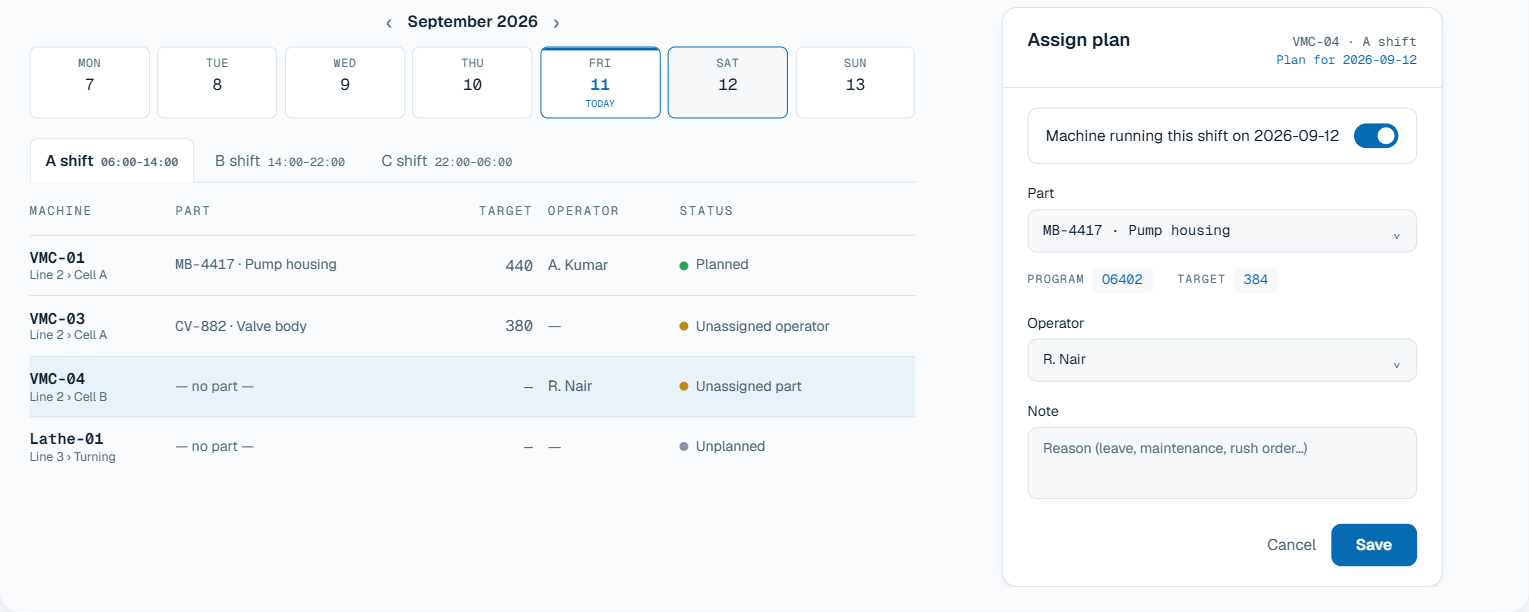
Part/target/operator are assigned here, ahead of time.
- The shift target computes itself from the part's engineered cycle time
- A machine nobody scheduled reads differently from one somebody half-scheduled
- Planned one day at a time — no recurring template to drift out of date
One entry per machine, shift and date. Clicking a row opens the assign drawer, where the program and the shift target derive themselves from the part picked.
 Tap to zoom
| Machine | Part | Target | Status | |
|---|---|---|---|---|
| VMC-01Line 2 › Cell A | MB-4417 · Pump housing | 440 | A. Kumar | Planned |
| VMC-03Line 2 › Cell A | CV-882 · Valve body | 380 | — | Unassigned operator |
| VMC-04Line 2 › Cell B | — no part — | — | R. Nair | Unassigned part |
| Lathe-01Line 3 › Turning | — no part — | — | — | Unplanned |
Operator-Entered
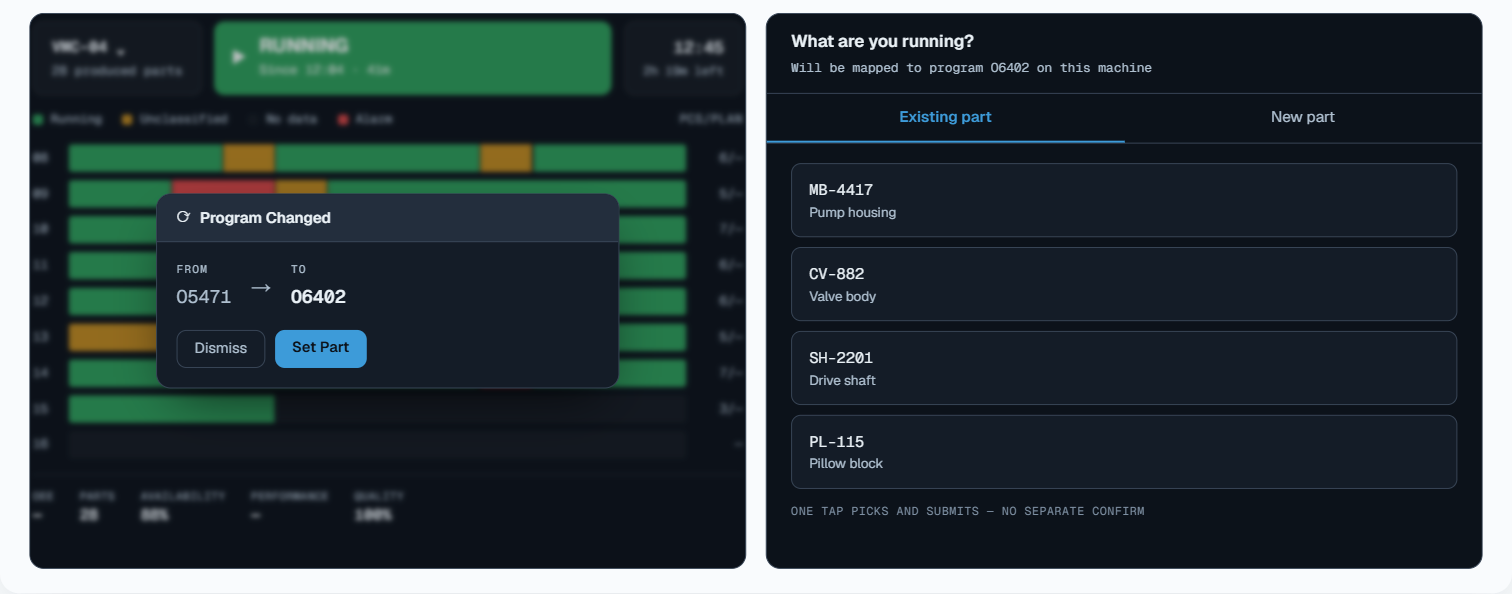
Operators declare their own part from the Operator Screen.
- The control triggers it — a program change, not a reminder
- The part the operator picks is mapped to that program
- The target still computes itself; who they are comes from their login
The banner appears on the machine's own screen when the live program stops matching the part on file. Setting the part maps it to that program, so the same changeover doesn't ask twice. The planning screen turns read-only while this mode is on.
 Tap to zoom
One tap picks and submits — no separate confirm
Which machine
Worst attainment first, because a ranking exists to be acted on
The same three days, broken out per machine, sorted by whichever is dragging hardest. Column headers don’t re-sort it. A ranking you can silently re-order isn’t a ranking.
| Machine | GoodGood parts | Plan | Attain.Attainment | OEE | |
|---|---|---|---|---|---|
| VMC-04 | 722 | 1,152 | 62.7% | 52.1% | 4h 06m |
| VMC-01 | 1,233 | 1,320 | 93.4% | 77.4% | 1h 42m |
| VMC-03 | 1,279 | 1,344 | 95.2% | 79.8% | 1h 24m |
| Lathe-01 | 1,202 | 1,224 | 98.2% | 84.7% | 1h 09m |
Where the hours went
Production is the hours that ran, minus the hours something took
604 parts short isn’t an answer, it’s a question. A shift only ever splits two ways — time that made parts and time that didn’t — so a shortfall stays unexplained until the second half has names and hours against it. Everything above accounts for the running hours. This is the other side of that subtraction, which is why the downtime breakdown belongs on a production page and not only on a downtime one.
Each reason carries its own configured colour · unclassified keeps its own bar
Why the target slips
Cycle drift stays invisible until it's plotted against the standard
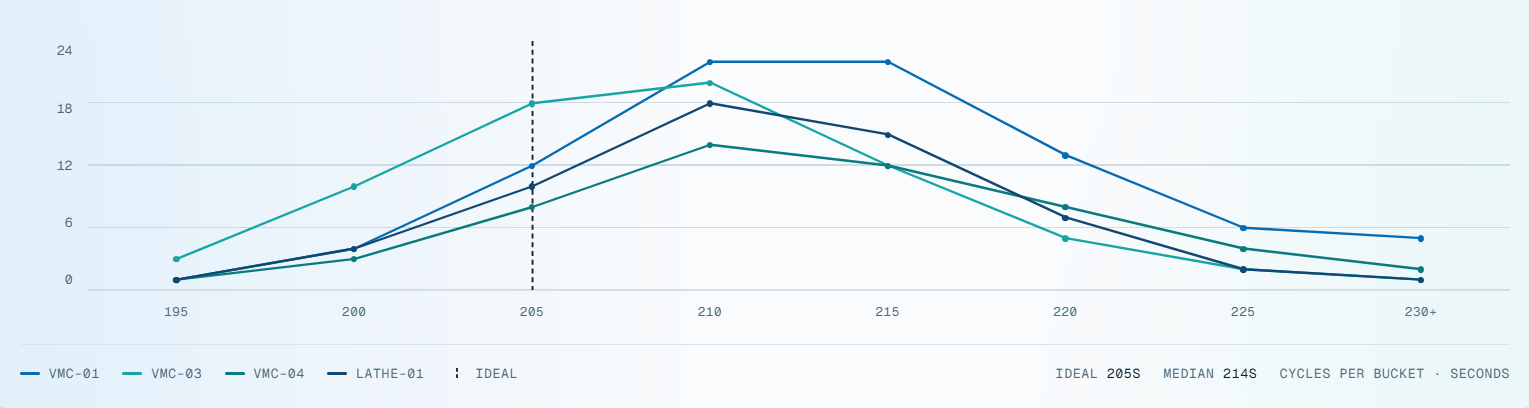
Every completed cycle for one part, bucketed by duration and stacked by the machine that ran it. Nine seconds over the standard costs about six parts per machine per shift — and the stack shows which machine is spending them.
Completed cycles by duration. Ideal is the part's engineered cycle time, never a target somebody typed in.
 Tap to zoom
Read from the control's own produced-parts counter, which it increments at M30 as each part completes. Where a control doesn't maintain that counter, the part program increments a macro variable that gets read instead. A part is only counted when the number rises, so a counter reset at shift change never reads as output.
A four-up fixture yields four parts per cycle, not one. Set once against the part, overridable per program, and applied to every count and cycle figure after it.
Held against the part rather than the machine, so the same part running on two machines is judged against one standard and the gap between them becomes visible.
Logged against the same window the parts were counted in — never a different window, and never assumed to be zero.
Where most tools guess
With no plan to measure against, the number stays blank.
An invented percentage reads as a catastrophe. It sends a supervisor to a machine that ran perfectly well against a target nobody ever set. So attainment comes back empty, captioned no plan set for this window, until there’s a real target to compare it to.
The same rule holds plant-wide. A machine with no plan is left out of the attainment figure entirely rather than padding a denominator it never contributed to. Its parts still count toward output — they just aren’t measured against a target that doesn’t exist.
Built for real shift patterns
Your plant's day, not the software's
Most tools quietly assume a day starts at midnight. Almost no plant works that way, and every production report is wrong by one shift until it’s fixed.
03:00 still belongs to yesterday
Set the boundary to 06:00 and last night's overnight shift finishes on yesterday's count. Today, this week and this month all follow that same rule.
A Saturday night shift reports as Saturday
Even when it runs into Sunday morning — the way it was scheduled, and the way your supervisor talks about it.
Every screen reads in plant time
Not the viewer's laptop. A manager checking the shift from another city sees the same clock the floor does.
Questions
Before you book a demo
From the control's own produced-parts counter, which it increments at M30 as each part completes, read over the native connection. Where a control doesn't maintain that counter, the part program increments a macro variable that gets read instead. Counts only ever advance when the number rises, so a counter reset at shift change isn't mistaken for production.
Yes — set the part and target quantity per machine and shift, and the report shows output against that target hour by hour while the shift is still running. Full scheduling systems are deliberately out of scope; we track against the plan you already have.
Yes. The part being run can be set from the operator station at the machine, and cycle-time references follow the part rather than the machine, so a part moving between machines is still judged against one standard.
Every report exports to PDF, and shift summaries can be sent automatically at shift end.
See it on your machines
A 30-minute call, your controllers, your shift pattern, and the timeline above filled in with your own shift.